<?xml version="1.0" encoding="utf-8"?><feed xmlns="http://www.w3.org/2005/Atom" ><generator uri="https://jekyllrb.com/" version="3.10.0">Jekyll</generator><link href="https://benhamilton.github.io/feed.xml" rel="self" type="application/atom+xml" /><link href="https://benhamilton.github.io/" rel="alternate" type="text/html" /><updated>2025-10-16T06:24:54+00:00</updated><id>https://benhamilton.github.io/feed.xml</id><title type="html">Ben Hamilton</title><subtitle>what I thought</subtitle><entry><title type="html">Have My Notes Show In Search Engine Results</title><link href="https://benhamilton.github.io/2024-12-12-have-my-notes-show-in-search-engine-results" rel="alternate" type="text/html" title="Have My Notes Show In Search Engine Results" /><published>2024-12-12T00:00:00+00:00</published><updated>2024-12-12T00:00:00+00:00</updated><id>https://benhamilton.github.io/have-my-notes-show-in-search-engine-results</id><content type="html" xml:base="https://benhamilton.github.io/2024-12-12-have-my-notes-show-in-search-engine-results"><![CDATA[<p>I have for some years now kept my own notes in <a href="https://obsidian.md/">Obsidian</a>. And it’s bugged me that I’ll do a search using Google or DuckDuckGo for a thing I’ve already made a note about, a note that actually contains the answer I’m now searching for.</p>

<p>This has meant that I’ve tried to get into the habit of searching my own notes first, but that doesn’t always happen, especially when I’m already in a web browser window it’s easy to open a new tab and search.</p>

<p>However that has now changed.</p>

<p>Enter <a href="https://publish.obsidian.md/omnisearch/Inject+Omnisearch+results+into+your+search+engine">Omnisearch</a></p>

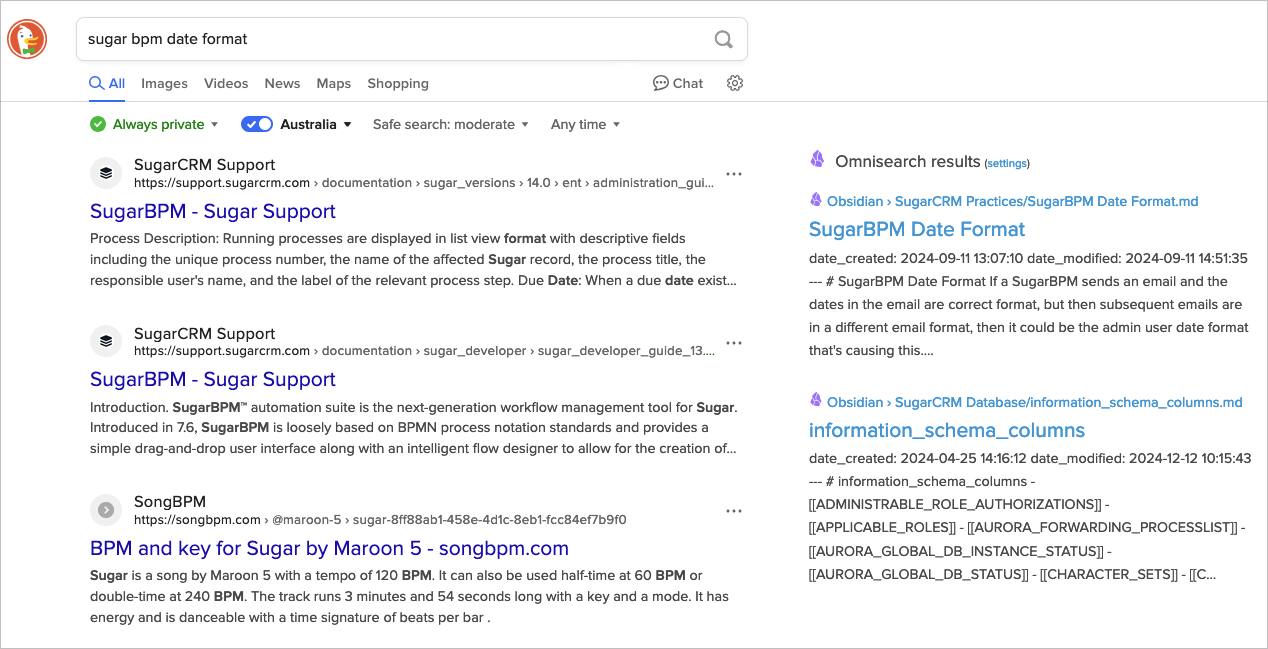
<p>By installing this plugin in Obsidian, turning on the built in HTTP server, then installing the Omnisearch Companion, Tampermonkey, and the userscript for both Google and DuckDuckGo (the two search engines I tend to use, but Kagi and Bing are also supported) I can now search in the search engine and see my notes appear at the side of those results. SO. AWESOME.</p>

<p><img src="/images/obsidian-omnisearch-example.png" alt="Example screenshot" /></p>]]></content><author><name></name></author><summary type="html"><![CDATA[I have for some years now kept my own notes in Obsidian. And it’s bugged me that I’ll do a search using Google or DuckDuckGo for a thing I’ve already made a note about, a note that actually contains the answer I’m now searching for. This has meant that I’ve tried to get into the habit of searching my own notes first, but that doesn’t always happen, especially when I’m already in a web browser window it’s easy to open a new tab and search. However that has now changed. Enter Omnisearch By installing this plugin in Obsidian, turning on the built in HTTP server, then installing the Omnisearch Companion, Tampermonkey, and the userscript for both Google and DuckDuckGo (the two search engines I tend to use, but Kagi and Bing are also supported) I can now search in the search engine and see my notes appear at the side of those results. SO. AWESOME.]]></summary></entry><entry><title type="html">How I Manage Email</title><link href="https://benhamilton.github.io/2020-07-05-how-i-manage-email" rel="alternate" type="text/html" title="How I Manage Email" /><published>2020-07-05T00:00:00+00:00</published><updated>2020-07-05T00:00:00+00:00</updated><id>https://benhamilton.github.io/how-i-manage-email</id><content type="html" xml:base="https://benhamilton.github.io/2020-07-05-how-i-manage-email"><![CDATA[<p>My sister commented that <a href="https://twitter.com/abbeydiaz_says/status/1275954452776640512">she needs a system to manage her email</a>. I’m not the best at this, but I do have a system that works for me. This is how I manage email.<!--more--></p>

<p>I draw on a couple of principles from <a href="https://gettingthingsdone.com/">GTD</a>, and from <a href="http://www.43folders.com/izero">Inbox Zero</a>. They are:</p>

<ol>
  <li>Process it once (GTD/Inbox Zero)</li>
  <li>If it takes less than two minutes, do it now (GTD)</li>
</ol>

<p>Here’s how that looks:</p>

<ul>
  <li>I check email two or three times a day, typically once in the morning, just after lunch and late afternoon. While I feel that still to frequent, it keeps others around me happy. Checking it any less and they start to notice, checking it more frequently and they also don’t notice.</li>
  <li>I go through the list of emails, if the FROM persons name or email address, or the subject line tells me there is nothing in this email for me, I don’t even open it (newsletters, automated updates etc). This doesn’t mean I don’t read all newsletters or all updates, I just don’t read those that can’t grab me in that moment.</li>
  <li>Those I need to read (co-workers, clients, personal friends) and those from above that made it through that filter, I read. I’m fully there for that email.</li>
  <li>However, if that email loses me, like many newsletters, gone.</li>
  <li>If there is an action required of me, for example I need to do something, or check if others have done something, I create either a task in the appropriate system (SugarCRM, Reminders, Jira, Git) or a meeting (SugarCRM, Calendar).</li>
  <li>If there is something I need to refer back to, I copy it to the appropriate system (my Zettelkasten, Confluence, SugarCRM, or client/project folder)</li>
  <li>If it requires a reply, I reply. This takes less than two minutes. If it will take more than two minutes, it was taken care of by an earlier step, if not I go back to that prior step.</li>
</ul>

<p>It’s important to remember that email clients are not task management systems, scheduling systems or knowledge systems. In the same way that a carpenter uses the right tool for the job, as knowledge workers we too should use the right tool for the job.</p>

<p>Sometimes, as in this case, the <em>tool</em> is the methodology, not so much the actual tools used. The tools I use can be completely different to the tools another will use. It’s the process, the methodology that matters.</p>

<p>Investing the time to clarify how we process a <em>thing</em> pays off over time.</p>]]></content><author><name></name></author><summary type="html"><![CDATA[My sister commented that she needs a system to manage her email. I’m not the best at this, but I do have a system that works for me. This is how I manage email.]]></summary></entry><entry><title type="html">Jekyll Now Reinstall</title><link href="https://benhamilton.github.io/2020-06-09-jekyll-now-reinstall" rel="alternate" type="text/html" title="Jekyll Now Reinstall" /><published>2020-06-09T00:00:00+00:00</published><updated>2020-06-09T00:00:00+00:00</updated><id>https://benhamilton.github.io/jekyll-now-reinstall</id><content type="html" xml:base="https://benhamilton.github.io/2020-06-09-jekyll-now-reinstall"><![CDATA[<p>Having migrated to a new laptop, I needed to reinstall Jekyll Now. And it failed. But then it worked.<!--more--></p>

<p>Because I was able to clone the git repo to my local, and that repo was already configured/set for publishing to github pages, all I needed to do was install github pages locally, rather than Jekyll etc.</p>

<p>I could make changes, commit the change, push it and it would appear on the live site, but I couldn’t preview it locally with Jekyll. Hence why github pages locally installed, it contains Jekyll.</p>

<p>However, when trying to install <code class="language-plaintext highlighter-rouge">github-pages</code> I was getting this error:</p>

<div class="language-zsh highlighter-rouge"><div class="highlight"><pre class="highlight"><code>	gem <span class="nb">install </span>github-pages
	ERROR:  While executing gem ... <span class="o">(</span>Gem::FilePermissionError<span class="o">)</span>
		You don<span class="s1">'t have write permissions for the /Library/Ruby/Gems/2.6.0 directory.
</span></code></pre></div></div>

<p>Using the instuctions kindly noted by <a href="https://programmingzen.com/installing-rbenv-on-zsh-on-macos/">Antonio Cangiano</a> at Programming Zen<sup id="fnbl-20200609171844"><a href="#fn-20200609171844">1</a></sup>.</p>

<p>Summary below (Antonio explains it in more detail)</p>

<div class="language-zsh highlighter-rouge"><div class="highlight"><pre class="highlight"><code>	brew update <span class="o">&amp;&amp;</span> brew <span class="nb">install </span>rbenv ruby-build
	<span class="nb">export </span><span class="nv">path</span><span class="o">=</span><span class="s2">"</span><span class="nv">$HOME</span><span class="s2">/.rbenv/bin:</span><span class="nv">$PATH</span><span class="s2">"</span>
</code></pre></div></div>

<p>Add the following to <code class="language-plaintext highlighter-rouge">.zshenv</code></p>

<div class="language-zsh highlighter-rouge"><div class="highlight"><pre class="highlight"><code>	<span class="nb">export </span><span class="nv">PATH</span><span class="o">=</span><span class="s2">"</span><span class="nv">$HOME</span><span class="s2">/.rbenv/bin:</span><span class="nv">$PATH</span><span class="s2">"</span>
</code></pre></div></div>

<p>Added the following to <code class="language-plaintext highlighter-rouge">.zshrc</code></p>

<div class="language-zsh highlighter-rouge"><div class="highlight"><pre class="highlight"><code>	<span class="nb">source</span> <span class="nv">$HOME</span>/.zshenv
	<span class="nb">eval</span> <span class="s2">"</span><span class="si">$(</span>rbenv init - zsh<span class="si">)</span><span class="s2">"</span>
</code></pre></div></div>

<p>Restart the iterm2 and run the following commands</p>

<div class="language-zsh highlighter-rouge"><div class="highlight"><pre class="highlight"><code>	rbenv <span class="nb">install </span>2.6.5
	rbenv global 2.6.5
</code></pre></div></div>

<p>Restart iterm2 and run the following command</p>

<div class="language-zsh highlighter-rouge"><div class="highlight"><pre class="highlight"><code>	ruby <span class="nt">-v</span>
</code></pre></div></div>

<p>You should see something like: <code class="language-plaintext highlighter-rouge">ruby 2.6.5p114 (2019-10-01 revision 67812) [x86_64-darwin19]</code> returned</p>

<p>Then run this command</p>

<div class="language-zsh highlighter-rouge"><div class="highlight"><pre class="highlight"><code>	ruby <span class="nt">-e</span> <span class="s2">"puts (1..100).reduce(:+)"</span>
</code></pre></div></div>

<p>You should see <code class="language-plaintext highlighter-rouge">5050</code> returned</p>

<p>Now install github-pages</p>

<div class="language-zsh highlighter-rouge"><div class="highlight"><pre class="highlight"><code>	gem <span class="nb">install </span>github-pages
</code></pre></div></div>

<p>Now when running <code class="language-plaintext highlighter-rouge">jekyll serve</code> in the root of the local repo, I can use a browser to view the site before issuing a <code class="language-plaintext highlighter-rouge">git push</code>.</p>

<hr />

<ol>
	<li id="fn-20200609171844">
		<p>He was getting a similar error for htmlbeautifier. His explaination contains more detail.<a href="#fnbl-20200609171844" class="FootNoteBackLink" title="Jump back to footnote 1 in the text.">↩︎</a></p>
	</li>
</ol>]]></content><author><name></name></author><summary type="html"><![CDATA[Having migrated to a new laptop, I needed to reinstall Jekyll Now. And it failed. But then it worked.]]></summary></entry><entry><title type="html">Command P to Print</title><link href="https://benhamilton.github.io/2020-05-20-command-p-to-print" rel="alternate" type="text/html" title="Command P to Print" /><published>2020-05-20T00:00:00+00:00</published><updated>2020-05-20T00:00:00+00:00</updated><id>https://benhamilton.github.io/command-p-to-print</id><content type="html" xml:base="https://benhamilton.github.io/2020-05-20-command-p-to-print"><![CDATA[<p>David Sparks over at macsparky.com has <em>forever</em> had <em>the</em> post on how to <a href="https://www.macsparky.com/blog/2019/9/command-p-as-canon">print using ⌘P⌘P to print to PDF</a>. Last September he posted that it had now become canon at <a href="https://apps.apple.com/us/story/id1467788599">Apple</a>.<!--more--></p>

<p>This post is simply so I can find it again in another couple of years, when I go to setup a new Mac.</p>]]></content><author><name></name></author><summary type="html"><![CDATA[David Sparks over at macsparky.com has forever had the post on how to print using ⌘P⌘P to print to PDF. Last September he posted that it had now become canon at Apple.]]></summary></entry><entry><title type="html">Footnotes in Markdown</title><link href="https://benhamilton.github.io/2020-05-18-footnotes-in-markdown" rel="alternate" type="text/html" title="Footnotes in Markdown" /><published>2020-05-18T00:00:00+00:00</published><updated>2020-05-18T00:00:00+00:00</updated><id>https://benhamilton.github.io/footnotes-in-markdown</id><content type="html" xml:base="https://benhamilton.github.io/2020-05-18-footnotes-in-markdown"><![CDATA[<p>Using markdown is great. Creating and using footnotes in markdown is very manual. Painful even.</p>

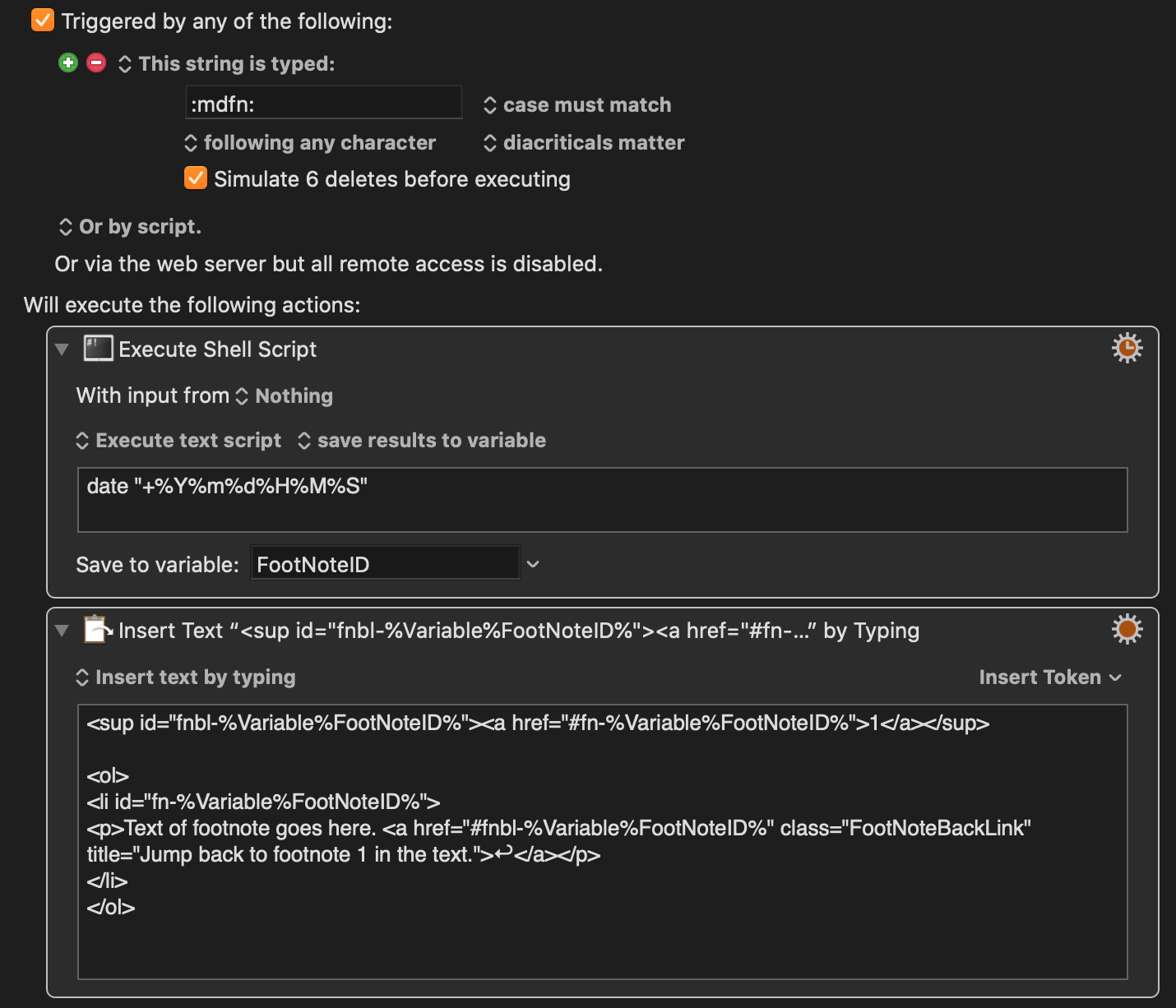
<p>So I’ve created a Keyboard Maestro shortcut to make them easier.<!--more--></p>

<p><img src="../images/kbm-mdfn.png" alt="Keyboard Maestro Markdown Footnote Marcro" /></p>

<p>What it does is run a shell script to get the current date and time and saves that to a variable.</p>

<p>Then we <em>insert by typing</em> the HTML code to do the superscript<sup id="fnbl-20200519095757"><a href="#fn-20200519095757">1</a></sup> for the foot note.</p>

<p>We use the date-time variable to create a footnote id to go at the bottom of the document (ie <code class="language-plaintext highlighter-rouge">fn-yyyymmddhhmmss</code>) and a slight variation for the backlink back up to where the footnote was inserted (i.e. <code class="language-plaintext highlighter-rouge">fnbl-yyyymmddhhmmss</code>).</p>

<p>Then a line below insert an ordered list with a list item where the footnote text goes. Of course, we then move that to the bottom of the document.</p>

<p>If we have more than one, manually update the number used for the footnote. Because the list of footnotes at the end are in an ordered list, they will be numbered automatically.</p>

<p>If you’ve got a way to further automate this please let me know.</p>

<p><a href="../images/kbm-mdfn.kmmacros">Download the macro</a></p>

<ol>
	<li id="fn-20200519095757">
		<p>Text of footnote goes here. <a href="#fnbl-20200519095757" class="FootNoteBackLink" title="Jump back to footnote 1 in the text.">↩︎</a></p>
	</li>
</ol>]]></content><author><name></name></author><summary type="html"><![CDATA[Using markdown is great. Creating and using footnotes in markdown is very manual. Painful even. So I’ve created a Keyboard Maestro shortcut to make them easier.]]></summary></entry><entry><title type="html">Punctuation Em Dash</title><link href="https://benhamilton.github.io/2020-04-06-punctuation-em-dash" rel="alternate" type="text/html" title="Punctuation Em Dash" /><published>2020-04-06T00:00:00+00:00</published><updated>2020-04-06T00:00:00+00:00</updated><id>https://benhamilton.github.io/punctuation-em-dash</id><content type="html" xml:base="https://benhamilton.github.io/2020-04-06-punctuation-em-dash"><![CDATA[<p>To quote:</p>
<blockquote>
  <p>The em dash is perhaps the most versatile punctuation mark</p>
</blockquote>

<p>Useful site called <a href="https://www.thepunctuationguide.com/em-dash.html">thepunctuationguide.com</a> details how to use the em dash and many other punctuation marks.</p>]]></content><author><name></name></author><summary type="html"><![CDATA[To quote: The em dash is perhaps the most versatile punctuation mark Useful site called thepunctuationguide.com details how to use the em dash and many other punctuation marks.]]></summary></entry><entry><title type="html">Note Writing</title><link href="https://benhamilton.github.io/note-writing/" rel="alternate" type="text/html" title="Note Writing" /><published>2020-04-04T00:00:00+00:00</published><updated>2020-04-04T00:00:00+00:00</updated><id>https://benhamilton.github.io/note-writing</id><content type="html" xml:base="https://benhamilton.github.io/note-writing/"><![CDATA[<p>I’ve been slowing focusing more on my writing — in a journal, status updates, client communications and documentation. Part of improving my writing is the taking of notes. The way I’ve taken notes has been rather slowly improving, but today I stumbled upon someone who is thinking and writing about writing notes. <!--more--></p>

<p><a href="https://andymatuschak.org/">Andy Matuschak</a> has/is writing about <a href="https://notes.andymatuschak.org/zhmLXArqiCMDr9Q13ViqN3hh3SmrKzjQxWAr">Note-writing Systems</a>. He’s also written <a href="https://blog.andymatuschak.org/post/159340765257/exalting-data-missing-meaning">Exalting data, missing meaning</a> which I found interesting.</p>

<p>He comments on <a href="https://notes.andymatuschak.org/z3SjnvsB5aR2ddsycyXofbYR7fCxo7RmKW2be">evergreen note-writing as the basic unit of measure for knowledge work</a>, which is a new thought for me. I’ve typically measured work in terms of revenue, hours billed, or projects completed. While those measures are important, after reading his take, perhaps if I measure <em>evergreen notes</em> as the fundamental unit, that, I’m thinking will improve those other measures.</p>

<p>Says Andy:</p>
<blockquote>
  <p>… Most people use notes as a bucket for storage or scratch thoughts and Note-writing practices are generally ineffective.</p>
  <ul>
    <li>Evergreen note-writing helps insight accumulate</li>
    <li>Evergreen note-writing helps reading efforts accumulate</li>
    <li>Note-writing helps writing accumulate: these notes are the fuel for the Executable strategy for writing, particularly if you Create speculative outlines while you write.</li>
  </ul>
</blockquote>

<p>It’s certainly fueling thoughts for me…</p>]]></content><author><name></name></author><summary type="html"><![CDATA[I’ve been slowing focusing more on my writing — in a journal, status updates, client communications and documentation. Part of improving my writing is the taking of notes. The way I’ve taken notes has been rather slowly improving, but today I stumbled upon someone who is thinking and writing about writing notes.]]></summary></entry><entry><title type="html">Python Simulations</title><link href="https://benhamilton.github.io/2020-04-01-python-simulations.md" rel="alternate" type="text/html" title="Python Simulations" /><published>2020-04-01T00:00:00+00:00</published><updated>2020-04-01T00:00:00+00:00</updated><id>https://benhamilton.github.io/python-simulations</id><content type="html" xml:base="https://benhamilton.github.io/2020-04-01-python-simulations.md"><![CDATA[<p>Good article over at Real Python on <a href="https://realpython.com/simpy-simulating-with-python/">Simulating Real-World Processes With Python</a> that includes a walk through using an example.</p>]]></content><author><name></name></author><summary type="html"><![CDATA[Good article over at Real Python on Simulating Real-World Processes With Python that includes a walk through using an example.]]></summary></entry><entry><title type="html">Link Roundup Friday March 2020</title><link href="https://benhamilton.github.io/2020-03-27-links" rel="alternate" type="text/html" title="Link Roundup Friday March 2020" /><published>2020-03-27T00:00:00+00:00</published><updated>2020-03-27T00:00:00+00:00</updated><id>https://benhamilton.github.io/journaling</id><content type="html" xml:base="https://benhamilton.github.io/2020-03-27-links"><![CDATA[<p>A few links I don’t want to lose track of are below, perhaps some of you will also find them useful.<!--more--></p>

<ul>
  <li><a href="https://witanddelight.com/2020/03/20-journaling-prompts-i-swear-by-to-get-you-out-of-your-head/">20 Journaling Prompts I Swear by to Get You out of Your Head</a> - Journaling helps get stuff out of your head</li>
  <li><a href="https://www.perell.com/blog/the-ultimate-guide-to-writing-online">The Ultimate Guide to Writing Online</a> - We can all be better :)</li>
  <li><a href="https://realpython.com/podcasts/rpp/">The Real Python Podcast</a> - Great first episode, looking forward to the next episodes</li>
</ul>

<p>Later,<br />
Ben.</p>]]></content><author><name></name></author><summary type="html"><![CDATA[A few links I don’t want to lose track of are below, perhaps some of you will also find them useful.]]></summary></entry><entry><title type="html">Link Roundup Friday March 2020</title><link href="https://benhamilton.github.io/2020-03-27-links" rel="alternate" type="text/html" title="Link Roundup Friday March 2020" /><published>2020-03-27T00:00:00+00:00</published><updated>2020-03-27T00:00:00+00:00</updated><id>https://benhamilton.github.io/links</id><content type="html" xml:base="https://benhamilton.github.io/2020-03-27-links"><![CDATA[<p>A few links I don’t want to lose track of are below, perhaps some of you will also find them useful.<!--more--></p>

<ul>
  <li><a href="https://witanddelight.com/2020/03/20-journaling-prompts-i-swear-by-to-get-you-out-of-your-head/">20 Journaling Prompts I Swear by to Get You out of Your Head</a> - Journaling helps get stuff out of your head</li>
  <li><a href="https://www.perell.com/blog/the-ultimate-guide-to-writing-online">The Ultimate Guide to Writing Online</a> - We can all be better :)</li>
  <li><a href="https://realpython.com/podcasts/rpp/">The Real Python Podcast</a> - Great first episode, looking forward to the next episodes</li>
</ul>

<p>Later,<br />
Ben.</p>]]></content><author><name></name></author><summary type="html"><![CDATA[A few links I don’t want to lose track of are below, perhaps some of you will also find them useful.]]></summary></entry></feed>